
Download Bulk Write Result
Description
You can execute this API to download the result of a successful bulk write job that you initiated. This URL will also be sent in JSON response for the success state.
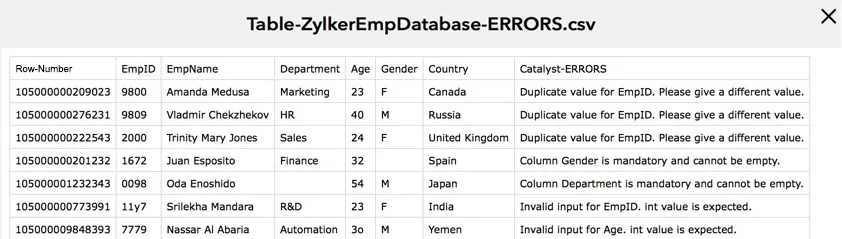
The downloaded CSV file will contain the details of the job execution. It will list all the records that were skipped from being written along with the reasons.
Request Details
Request URL
{api-domain}/baas/v1/project/{project_id}/bulk/write/{job_id}/download
The unique ID of the job that was sent in the initial [in-progress status response](/en/api/introduction/overview-and-prerequisites/#response-details) after the Bulk Write API was executed
Request Headers
Authorization: Zoho-oauthtoken {oauth_token}
Optional Headers
CATALYST-ORG: {org_id}
Environment: Development
Scope
ZohoCatalyst.tables.bulk.CREATE
Response Details
The bulk write result file will be automatically downloaded to the configured directory in your system after you execute this API.
File format: ZIP file containing the CSV result file
Sample result file showing the details of a bulk write job:
curl -X GET

https://api.catalyst.zoho.com/baas/v1/project/4000000006007/bulk/write/2000000110044/download

-H “Authorization: Zoho-oauthtoken 1000.910*************************16.2f*************************57”
Yes
No
Send your feedback to us